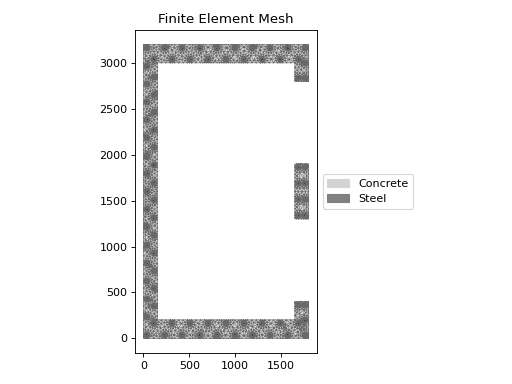
double_lift_core_a
- sectionproperties.pre.library.concrete_sections.double_lift_core_a(d: float, b: float, t1: float, t2: float, a1: float, a2: float, dia_bar: float, area_bar: float, spacing: float, cover: float, double: bool = True, n_circle: int = 4, conc_mat: Material = Material(name='default', elastic_modulus=1, poissons_ratio=0, yield_strength=1, density=1, color='w'), steel_mat: Material = Material(name='default', elastic_modulus=1, poissons_ratio=0, yield_strength=1, density=1, color='w')) CompoundGeometry[source]
Constructs a reinforced concrete double lift core (type A) section.
Constructs a reinforced concrete double lift core (type A) section of depth
d, widthb, top/bottom thicknesst1, left/right thicknesst2, door opening widtha1and door pier weidtha2. The wall reinforcement has a maximum spacing ofspacingand is doubly reinforced ifdoubleis set toTrue, or singly reinforced if it is set toFalse.Type A refers to the fact that there is no wall dividing the two lift cores.
Note
As the reinforcing bars are described by discretised circles, the area of each bar is required to ensure that the correct reinforcing area is provided.
- Parameters:
d (float) – Concrete wall depth
b (float) – Concrete wall width
t1 (float) – Top/bottom concrete wall thickness
t2 (float) – Left/right concrete wall thickness
a1 (float) – Door opening width
a2 (float) – Door pier width
dia_bar (float) – Diameter of the reinforcing bars, used for calculating bar placement
area_bar (float) – Area of the reinforcing bars
spacing (float) – Maximum spacing of the reinforcement bars, the calculated spacing is equal to
ceil(extent / spacing) + 1cover (float) – Clear cover to the reinforcing bars
double (bool) – If set to
True, provides two layers of reinforcement to the wall. If set toFalse, provides a single central layer of reinforcement to the wall. Defaults toTrue.n_circle (int) – Number of points used to discretise the circular reinforcing bars. Defaults to
4.conc_mat (Material) – Material object to assign to the concrete area. Defaults to
pre.DEFAULT_MATERIAL.steel_mat (Material) – Material object to assign to the steel area. Defaults to
pre.DEFAULT_MATERIAL.
- Raises:
ValueError – Geometry generation failed
ValueError – If the lift door opening geometry is invalid
- Returns:
Reinforced concrete double lift core (type A) section geometry
- Return type:
Example
The following example creates a 3200 mm deep x 1800 mm wide double lift core (type A) concrete section, with top/bottom walls 200 mm thick, left/right walls 150 mm thick, a door opening of 900 mm and a dor pier width of 600 mm. The wall is reinforced with a double layer of N16-200 with 30 mm cover. A coarse finite element mesh is generated to show the different material regions:
from sectionproperties.pre import Material
from sectionproperties.pre.library import double_lift_core_a
from sectionproperties.analysis import Section

concrete = Material(
    name="Concrete",
    elastic_modulus=30.1e3,
    poissons_ratio=0.2,
    yield_strength=32,
    density=2.4e-6,
    color="lightgrey",
)
steel = Material(
    name="Steel",
    elastic_modulus=200e3,
    poissons_ratio=0.3,
    yield_strength=500,
    density=7.85e-6,
    color="grey",
)

geom = double_lift_core_a(
    d=3200,
    b=1800,
    t1=200,
    t2=150,
    a1=900,
    a2=600,
    dia_bar=16,
    area_bar=200,
    spacing=200,
    cover=30,
    double=True,
    n_circle=12,
    conc_mat=concrete,
    steel_mat=steel,
)

geom.create_mesh(mesh_sizes=[0])  # a size of zero creates a coarse mesh
Section(geometry=geom).plot_mesh()
(
Source code,png,hires.png,pdf)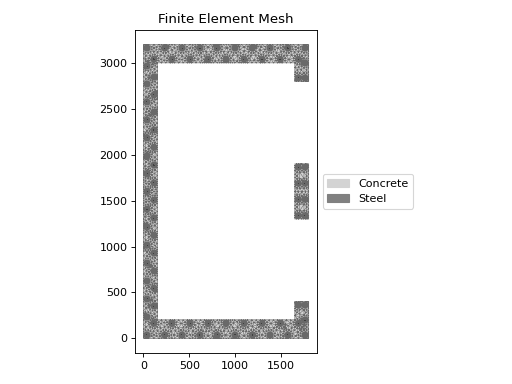
Reinforced concrete double lift core (type A) section geometry