StressPost
- class sectionproperties.post.stress_post.StressPost(section: Section)[source]
Bases:
objectClass for post-processing finite element stress results.
A StressPost object is created when a stress analysis is carried out and is returned as an object to allow post-processing of the results. The StressPost object creates a
deepcopyof theMaterialGroups within the cross-section to allow the calculation of stresses for each material. Methods for post-processing the calculated stresses are provided.- Variables:
section (Section) – Cross-section object for stress calculation
material_groups (MaterialGroup) – A deep copy of the
Sectionmaterial_groups
Methods
Returns the stresses within each material.
Plots Mohr's circles of the 3D stress state at position (
x,y).Plots filled stress contours over the finite element mesh.
Plots stress vectors over the finite element mesh.
- __init__(section: Section) None[source]
Inits the StressPost class.
- Parameters:
section (Section) – Cross-section object for stress calculation
- plot_stress(stress: str, title: str | None = None, cmap: str = 'coolwarm', stress_limits: tuple[float, float] | None = None, normalize: bool = True, fmt: str = '{x:.4e}', colorbar_label: str = 'Stress', alpha: float = 0.5, material_list: list[Material] | None = None, **kwargs: Any) matplotlib.axes.Axes[source]
Plots filled stress contours over the finite element mesh.
- Parameters:
stress (str) – Type of stress to plot, see below for allowable values
title (str | None) – Plot title, if None uses default plot title for selected stress. Defaults to
None.cmap (str) – Matplotlib color map, see https://matplotlib.org/stable/tutorials/colors/colormaps.html for more detail. Defaults to
"coolwarm".stress_limits (tuple[float, float] | None) – Custom colorbar stress limits (sig_min, sig_max), values outside these limits will appear as white. Defaults to
None.normalize (bool) – If set to True,
CenteredNormis used to scale the colormap, if set to False, the default linear scaling is used. Defaults toTrue.fmt (str) – Number formatting string, see https://docs.python.org/3/library/string.html. Defaults to
"{x:.4e}".colorbar_label (str) – Colorbar label. Defaults to
"Stress".alpha (float) – Transparency of the mesh outlines: \(0 \leq \alpha \leq 1\). Defaults to
0.5.material_list (list[Material] | None) – If specified, only plots materials present in the list. If set to None, plots all materials. Defaults to
None.kwargs (Any) – Passed to
plotting_context()
- Raises:
RuntimeError – If the plot failed to be generated
- Returns:
Matplotlib axes object
- Return type:
- plot_stress_vector(stress: str, title: str | None = None, cmap: str = 'YlOrBr', normalize: bool = False, fmt: str = '{x:.4e}', colorbar_label: str = 'Stress', alpha: float = 0.2, **kwargs: Any) Axes[source]
Plots stress vectors over the finite element mesh.
- Parameters:
stress (str) – Type of stress to plot, see below for allowable values
title (str | None) – Plot title, if None uses default plot title for selected stress. Defaults to
None.cmap (str) – Matplotlib color map, see https://matplotlib.org/stable/tutorials/colors/colormaps.html for more detail. Defaults to
"YlOrBr".normalize (bool) – If set to True,
CenteredNormis used to scale the colormap, if set to False, the default linear scaling is used. Defaults toTrue.fmt (str) – Number formatting string, see https://docs.python.org/3/library/string.html. Defaults to
"{x:.4e}".colorbar_label (str) – Colorbar label. Defaults to
"Stress".alpha (float) – Transparency of the mesh outlines: \(0 \leq \alpha \leq 1\). Defaults to
0.2.kwargs (Any) – Passed to
plotting_context()
- Raises:
RuntimeError – If the plot failed to be generated
- Returns:
Matplotlib axes object
- Return type:
- get_stress() list[dict[str, str | ndarray[tuple[Any, ...], dtype[float64]]]][source]
Returns the stresses within each material.
- Returns:
A list of dictionaries containing the cross-section stresses at each node for each material
- Return type:
list[dict[str, str | ndarray[tuple[Any, …], dtype[float64]]]]
Note
Each list of stresses in the dictionary contains the stresses at every node (order from
node 0tonode n) in the entire mesh. As a result, when the current material does not exist at a node, a value of zero will be reported.Dictionary keys and values
In general the stresses are described by an action followed by a stress direction
(action)_(stress-direction), e.g.mzz_zxrepresents the shear stress in thezxdirection caused by the torsionmzz.Below is a list of the returned dictionary keys and values:
"material"- material name"sig_zz_n"- normal stress \(\sigma_{zz,N}\) resulting from the axial load \(N\)"sig_zz_mxx"- normal stress \(\sigma_{zz,Mxx}\) resulting from the bending moment \(M_{xx}\)"sig_zz_myy"- normal stress \(\sigma_{zz,Myy}\) resulting from the bending moment \(M_{yy}\)"sig_zz_m11"- normal stress \(\sigma_{zz,M11}\) resulting from the bending moment \(M_{11}\)"sig_zz_m22"- normal stress \(\sigma_{zz,M22}\) resulting from the bending moment \(M_{22}\)"sig_zz_m"- normal stress \(\sigma_{zz,\Sigma M}\) resulting from all bending moments \(M_{xx} + M_{yy} + M_{11} + M_{22}\)"sig_zx_mzz"-xcomponent of the shear stress \(\sigma_{zx,Mzz}\) resulting from the torsion moment \(M_{zz}\)"sig_zy_mzz"-ycomponent of the shear stress \(\sigma_{zy,Mzz}\) resulting from the torsion moment \(M_{zz}\)"sig_zxy_mzz"- resultant shear stress \(\sigma_{zxy,Mzz}\) resulting from the torsion moment \(M_{zz}\)"sig_zx_vx"-xcomponent of the shear stress \(\sigma_{zx,Vx}\) resulting from the shear force \(V_{x}\)"sig_zy_vx"-ycomponent of the shear stress \(\sigma_{zy,Vx}\) resulting from the shear force \(V_{x}\)"sig_zxy_vx"- resultant shear stress \(\sigma_{zxy,Vx}\) resulting from the shear force \(V_{x}\)"sig_zx_vy"-xcomponent of the shear stress \(\sigma_{zx,Vy}\) resulting from the shear force \(V_{y}\)"sig_zy_vy"-ycomponent of the shear stress \(\sigma_{zy,Vy}\) resulting from the shear force \(V_{y}\)"sig_zxy_vy"- resultant shear stress \(\sigma_{zxy,Vy}\) resulting from the shear force \(V_{y}\)"sig_zx_v"-xcomponent of the shear stress \(\sigma_{zx,\Sigma V}\) resulting from the sum of the applied shear forces \(V_{x} + V_{y}\)."sig_zy_v"-ycomponent of the shear stress \(\sigma_{zy,\Sigma V}\) resulting from the sum of the applied shear forces \(V_{x} + V_{y}\)."sig_zxy_v"- resultant shear stress \(\sigma_{zxy,\Sigma V}\) resulting from the sum of the applied shear forces \(V_{x} + V_{y}\)"sig_zz"- combined normal stress \(\sigma_{zz}\) resulting from all actions"sig_zx"-xcomponent of the shear stress \(\sigma_{zx}\) resulting from all actions"sig_zy"-ycomponent of the shear stress \(\sigma_{zy}\) resulting from all actions"sig_zxy"- resultant shear stress \(\sigma_{zxy}\) resulting from all actions"sig_11"- major principal stress \(\sigma_{11}\) resulting from all actions"sig_33"- minor principal stress \(\sigma_{33}\) resulting from all actions"sig_vm"- von Mises stress \(\sigma_{vM}\) resulting from all actions
- plot_mohrs_circles(x: float, y: float, title: str | None = None, **kwargs: Any) Axes[source]
Plots Mohr’s circles of the 3D stress state at position (
x,y).- Parameters:
x (float) – x-coordinate of the point to draw Mohr’s Circle
y (float) – y-coordinate of the point to draw Mohr’s Circle
title (str | None) – Plot title, if
Noneuses default plot title “Mohr’s Circles for 3D Stress State at {pt}”. Defaults toNone.kwargs (Any) – Passed to
plotting_context()
- Raises:
ValueError – If the point (
x,y) is not within the meshRuntimeError – If the plot failed to be generated
- Returns:
Matplotlib axes object
- Return type:
Example
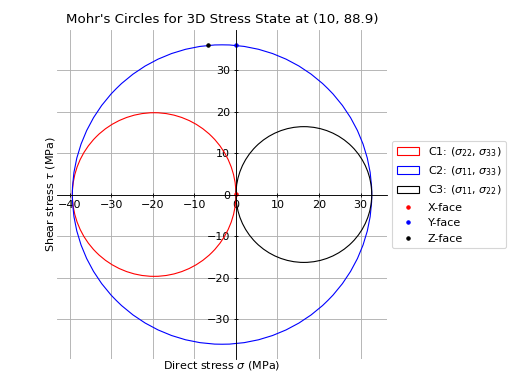
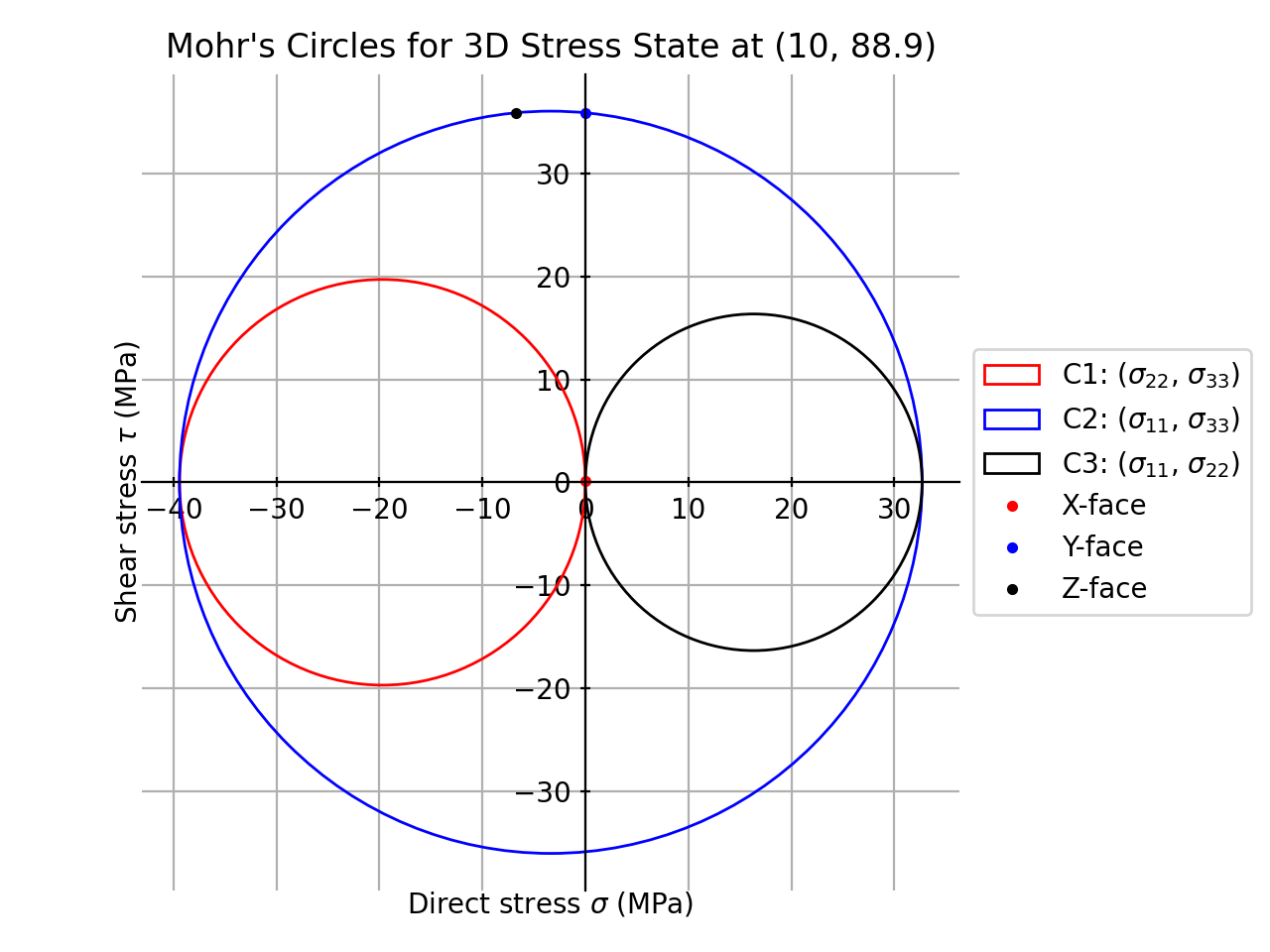
The following example plots the Mohr’s circles for the 3D stress state within a 150x90x12 UA section at the point
x=10,y=88.9resulting from the following actions:\(N = 50\) kN
\(M_{xx} = -5\) kN.m
\(M_{22} = 2.5\) kN.m
\(M_{zz} = 1.5\) kN.m
\(V_{x} = 10\) kN
\(V_{y} = 5\) kN
from sectionproperties.pre.library import angle_section
from sectionproperties.analysis import Section

# create geometry and section
geom = angle_section(d=150, b=90, t=12, r_r=10, r_t=5, n_r=8)
geom.create_mesh(mesh_sizes=[0])
sec = Section(geometry=geom)

# perform analysis
sec.calculate_geometric_properties()
sec.calculate_warping_properties()
post = sec.calculate_stress(
    n=50e3, mxx=-5e6, m22=2.5e6, mzz=0.5e6, vx=10e3, vy=5e3
)

# plot mohr's circle
post.plot_mohrs_circles(x=10, y=88.9)
(
Source code,png,hires.png,pdf)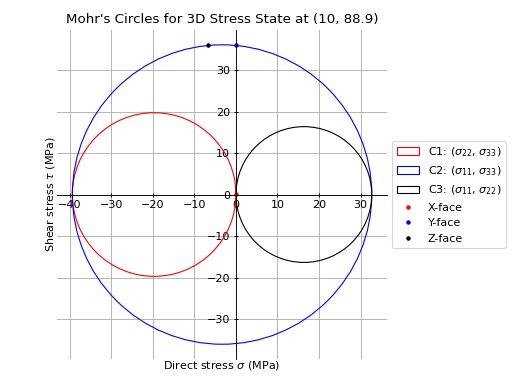
Mohr’s circles for a 150x90x12 UA