CompoundGeometry#
- class sectionproperties.pre.geometry.CompoundGeometry(geoms: MultiPolygon | list[Geometry])[source]#
Bases:
GeometryClass for defining a geometry of multiple distinct regions.
CompoundGeometry instances are composed of multiple Geometry objects. As with Geometry objects, CompoundGeometry objects have methods for generating a triangular mesh over all geometries, transforming the collection of geometries as though they were one (e.g. translation, rotation, and mirroring), and aligning the CompoundGeometry to another Geometry (or to another CompoundGeometry).
Each Geometry object may have different material properties.
CompoundGeometry objects can be created directly between two or more Geometry objects by using the
+operator.Methods
Aligns the CompoundGeometry to a center point.
Aligns the geometry to another Geometry object.
Assigns a control point to the geometry.
Calculates the area of the geometry.
Calculates the centroid of the geometry.
Calculate geometry extents.
Returns the length of the exterior perimeter of the CompoundGeometry.
Creates geometry data from shapely data.
Creates geometry data from shapely data.
Creates a quadratic triangular mesh from the CompoundGeometry object.
Creates a CompoundGeometry object from the objects in a Rhino
3dmfile.An interface for the creation of Geometry objects from CAD .dxf files.
Creates CompoundGeometry from points, facets, control points and holes.
Load an encoded single surface planer brep.
Mirrors the CompoundGeometry object about a point on either the x or y-axis.
Dilates/erodes the perimeter of a CompoundGeometry object by an amount.
Plots the geometry defined by the input section.
Rotates a CompoundGeometry object.
Shifts the points in the geometry.
Returns a CompoundGeometry object translated by (
x_offset,y_offset).Splits CompoundGeometry about a line.
Attributes
Returns the recovery points.
- __init__(geoms: MultiPolygon | list[Geometry]) None[source]#
Inits the CompoundGeometry class.
- Parameters:
geoms (MultiPolygon | list[Geometry]) – Either a list of Geometry objects or a
shapely.MultiPolygoninstance.
- static from_points(points: list[tuple[float, float]], facets: list[tuple[int, int]], control_points: list[tuple[float, float]], holes: list[tuple[float, float]] | None = None, materials: list[pre.Material] | None = None) CompoundGeometry[source]#
Creates CompoundGeometry from points, facets, control points and holes.
An interface for the creation of CompoundGeometry objects through the definition of points, facets, control points and holes. Geometries created through this method are expected to be non-ambiguous meaning that no “overlapping” geometries exists and that nodal connectivity is maintained (e.g. there are no nodes “overlapping” with facets without nodal connectivity).
- Parameters:
points (list[tuple[float, float]]) – List of points (
x,y) defining the vertices of the section geometry.facets (list[tuple[int, int]]) – A list of (
start,end) indices of vertices defining the edges of the section geoemtry. Can be used to define both external and internal perimeters of holes. Facets are assumed to be described in the order of exterior perimeter, interior perimeter 1, interior perimeter 2, etc.control_points (list[tuple[float, float]]) – A list of points (
x,y) that define regions as being distinct, contiguous, and having one material. The point can be located anywhere within region. Only one point is permitted per region. The order ofcontrol_pointsmust be given in the same order as the order that polygons are created byfacets.holes (list[tuple[float, float]] | None) – A list of points (
x,y) that define interior regions as being holes or voids. The point can be located anywhere within the hole region. Only one point is required per hole region.materials (list[pre.Material] | None) – A list of
Materialobjects that are to be assigned, in order, to the regions defined by the givencontrol_points. If not given, then theDEFAULT_MATERIALwill be used for each region.
- Raises:
ValueError – If there are materials provided without control points
ValueError – If the number of materials does not equal the number of control points
ValueError – If the number of exterior regions doesn’t match the number of control points
ValueError – If control points are not contained within geometries with holes
- Returns:
CompoundGeometry object from points
- Return type:
Example
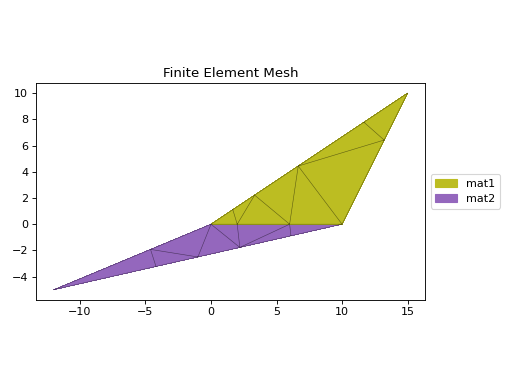
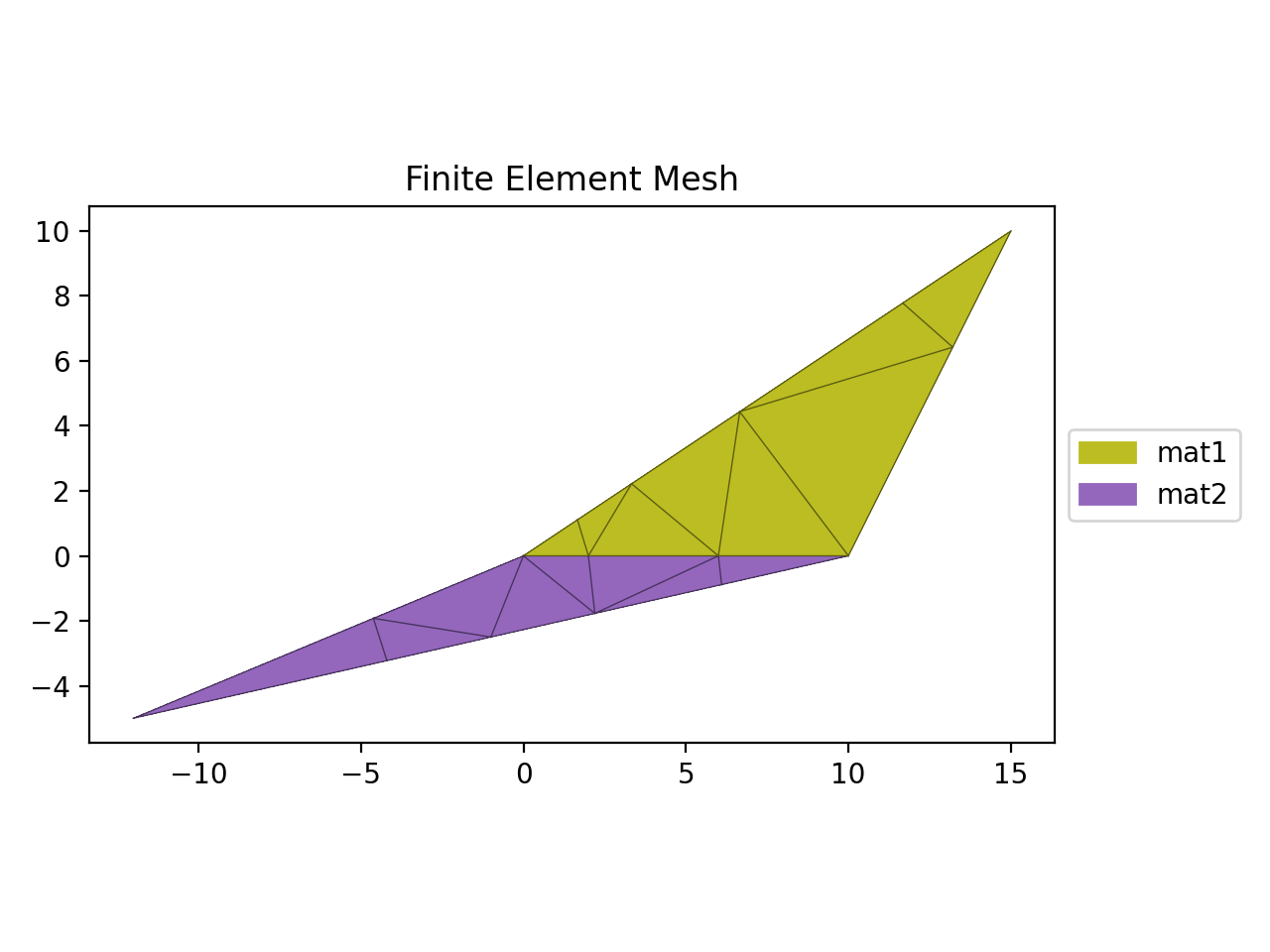
This example creates two regions with different material properties:
from sectionproperties.pre import Material, CompoundGeometry
from sectionproperties.analysis import Section

mat1 = Material(
    name="mat1",
    elastic_modulus=1.0,
    poissons_ratio=0.0,
    density=1.0,
    yield_strength=1.0,
    color="tab:olive",
)

mat2 = Material(
    name="mat2",
    elastic_modulus=2.0,
    poissons_ratio=0.0,
    density=2.0,
    yield_strength=2.0,
    color="tab:purple",
)

points = [(0, 0), (10, 0), (15, 10), (-12, -5)]
facets = [(0, 1), (1, 2), (2, 0), (1, 3), (3, 0), (0, 1)]
control_points = [(1, 1), (1, -1)]
materials = [mat1, mat2]

geom = CompoundGeometry.from_points(
    points=points,
    facets=facets,
    control_points=control_points,
    materials=materials,
)
geom.create_mesh(mesh_sizes=[0])
Section(geometry=geom).plot_mesh()
(
Source code,png,hires.png,pdf)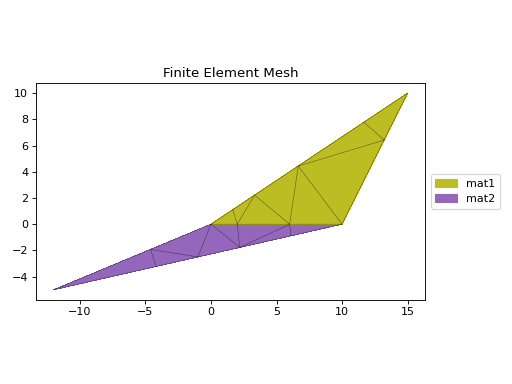
Composite CompoundGeometry created from points and facets.#
- classmethod from_3dm(filepath: str | pathlib.Path, **kwargs) CompoundGeometry[source]#
Creates a CompoundGeometry object from the objects in a Rhino
3dmfile.- Parameters:
filepath (str | pathlib.Path) – File path to the rhino
.3dmfile.kwargs – See below.
- Keyword Arguments:
refine_num (Optional[int]) – Bézier curve interpolation number. In Rhino a surface’s edges are nurb based curves. Shapely does not support nurbs, so the individual Bézier curves are interpolated using straight lines. This parameter sets the number of straight lines used in the interpolation. Default is 1.
vec1 (Optional[numpy.ndarray]) – A 3d vector in the Shapely plane. Rhino is a 3D geometry environment. Shapely is a 2D geometric library. Thus a 2D plane needs to be defined in Rhino that represents the Shapely coordinate system.
vec1represents the 1st vector of this plane. It will be used as Shapely’s x direction. Default is [1,0,0].vec2 (Optional[numpy.ndarray]) – Continuing from
vec1,vec2is another vector to define the Shapely plane. It must not be [0,0,0] and it’s only requirement is that it is any vector in the Shapely plane (but not equal tovec1). Default is [0,1,0].plane_distance (Optional[float]) – The distance to the Shapely plane. Default is 0.
project (Optional[bool]) – Controls if the breps are projected onto the plane in the direction of the Shapley plane’s normal. Default is True.
parallel (Optional[bool]) – Controls if only the rhino surfaces that have the same normal as the Shapely plane are yielded. If true, all non parallel surfaces are filtered out. Default is False.
- Raises:
ImportError – If
rhino3dmis not installed. To enable rhino features usepip install sectionproperties[rhino].- Returns:
CompoundGeometry object
- Return type:
- create_mesh(mesh_sizes: list[float], min_angle: float = 30.0, coarse: bool = False) CompoundGeometry[source]#
Creates a quadratic triangular mesh from the CompoundGeometry object.
- Parameters:
mesh_sizes (list[float]) – A float describing the maximum mesh element area to be used in the finite-element mesh for each Geometry object within the CompoundGeometry object. If a list of length 1 is passed, then the one size will be applied to all constituent Geometry meshes.
min_angle (float) – The meshing algorithm adds vertices to the mesh to ensure that no angle smaller than the minimum angle (in degrees, rounded to 1 decimal place). Note that small angles between input segments cannot be eliminated. If the minimum angle is 20.7 deg or smaller, the triangulation algorithm is theoretically guaranteed to terminate (given sufficient precision). The algorithm often doesn’t terminate for angles greater than 33 deg. Some meshes may require angles well below 20 deg to avoid problems associated with insufficient floating-point precision.
coarse (bool) – If set to True, will create a coarse mesh (no area or quality constraints)
- Returns:
CompoundGeometryobject with mesh data stored in.meshattribute. ReturnedCompoundGeometryobject is self, not a new instance.- Return type:
Example
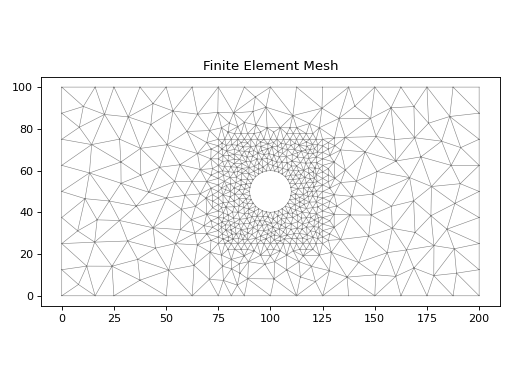
The following example creates a mesh for a plate with a hole, with a refined mesh around the hole region:
from sectionproperties.pre.library import rectangular_section
from sectionproperties.pre.library import circular_section
from sectionproperties.analysis import Section

outer_rect = rectangular_section(d=100, b=200)
inner_rect = rectangular_section(d=50, b=50).align_center(
    align_to=outer_rect
)
circle = circular_section(d=20, n=32).align_center(align_to=outer_rect)

geom = outer_rect - inner_rect + inner_rect - circle
geom.create_mesh(mesh_sizes=[100, 5])
Section(geometry=geom).plot_mesh(materials=False)
(
Source code,png,hires.png,pdf)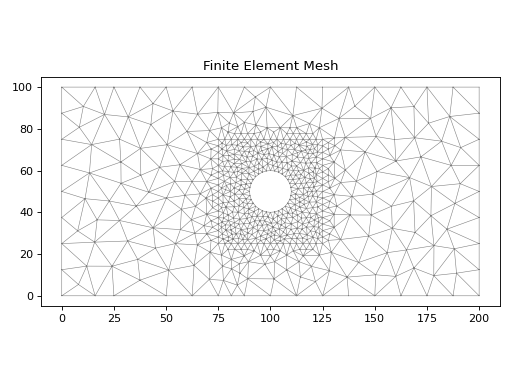
Mesh refinement around hole#
- shift_section(x_offset: float = 0.0, y_offset: float = 0.0) CompoundGeometry[source]#
Returns a CompoundGeometry object translated by (
x_offset,y_offset).- Parameters:
- Returns:
New Geometry object shifted by
x_offsetandy_offset- Return type:
- rotate_section(angle: float, rot_point: tuple[float, float] | str = 'center', use_radians: bool = False) CompoundGeometry[source]#
Rotates a CompoundGeometry object.
Rotates the CompoundGeometry and specified angle about a point. If the rotation point is not provided, rotates the section about the center of the CompoundGeometry’s bounding box.
- Parameters:
angle (float) – Angle (degrees by default) by which to rotate the section. A positive angle leads to a counter-clockwise rotation.
rot_point (tuple[float, float] | str) – Point (
x,y) about which to rotate the section. If not provided, will rotate about the center of the compound geometry’s bounding box.use_radians (bool) – Boolean to indicate whether
angleis in degrees or radians. If True,angleis interpreted as radians.
- Returns:
CompoundGeometry object rotated by
angleaboutrot_point- Return type:
Example
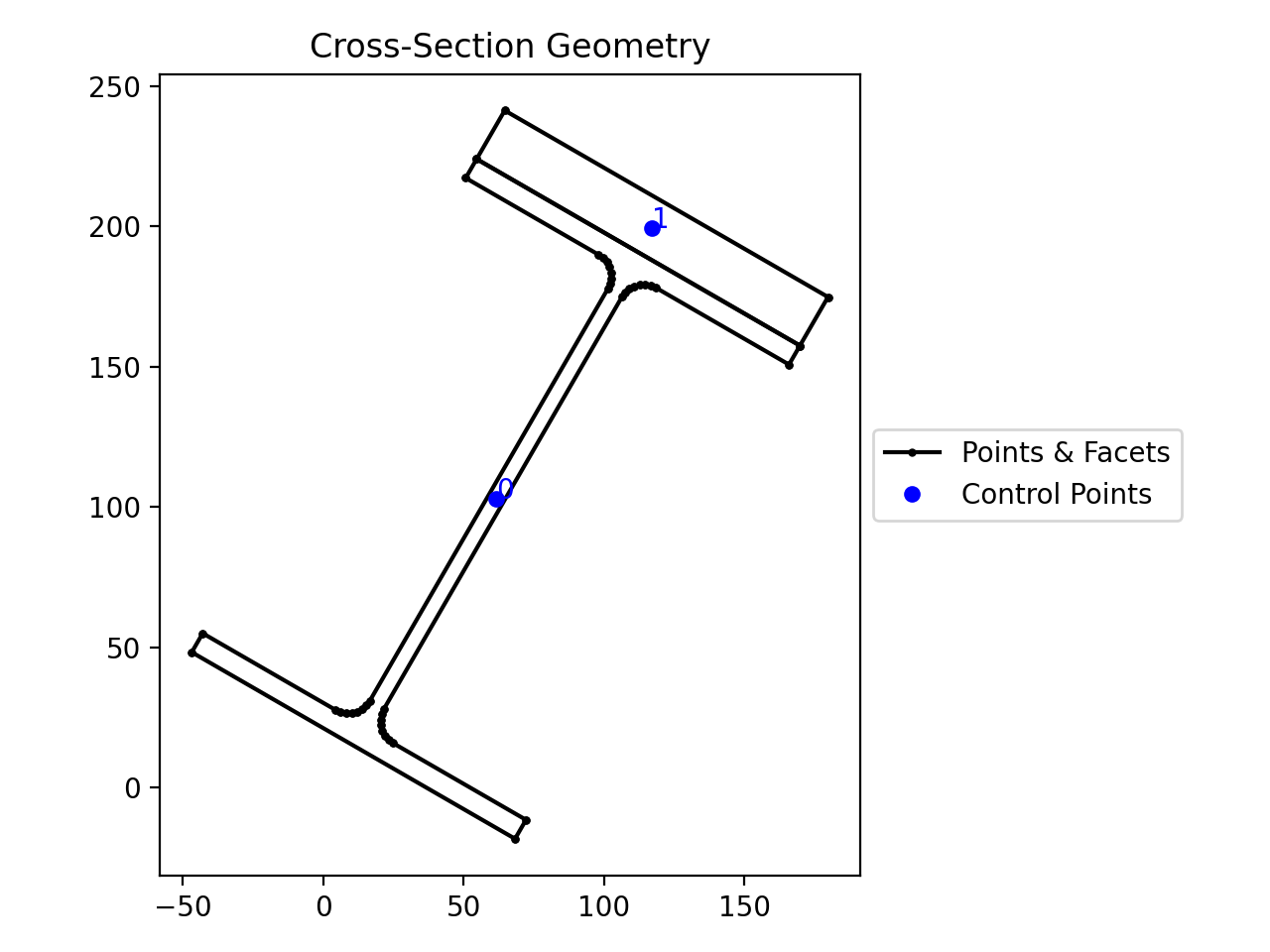
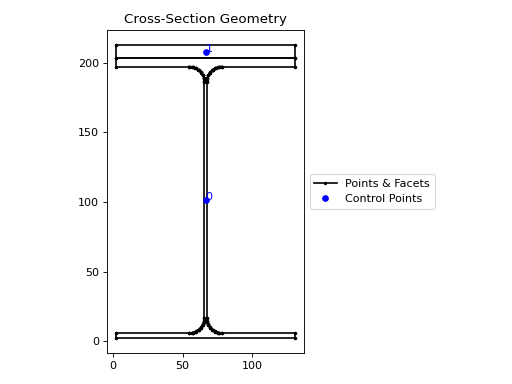
The following example rotates a 200UB25 section with a plate clockwise by 30 degrees:
from sectionproperties.pre.library import rectangular_section, i_section

geom1 = i_section(d=203, b=133, t_f=7.8, t_w=5.8, r=8.9, n_r=8)
geom2 = rectangular_section(d=20, b=133)
compound = geom1 + geom2.align_center(align_to=geom1).align_to(
    other=geom1, on="top"
)
compound.rotate_section(angle=-30).plot_geometry()
(
Source code,png,hires.png,pdf)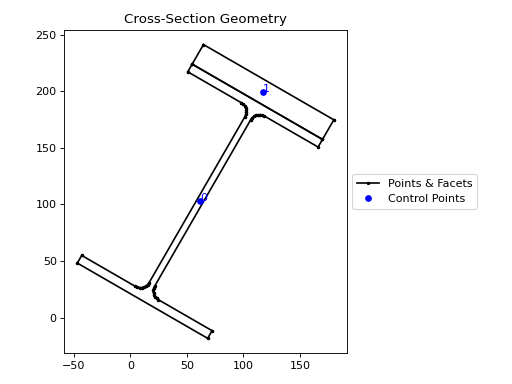
Reinforced 200UB25 rotated.#
- mirror_section(axis: str = 'x', mirror_point: tuple[float, float] | str = 'center') CompoundGeometry[source]#
Mirrors the CompoundGeometry object about a point on either the x or y-axis.
- Parameters:
- Returns:
CompoundGeometry object mirrored on
axisaboutmirror_point- Return type:
Example
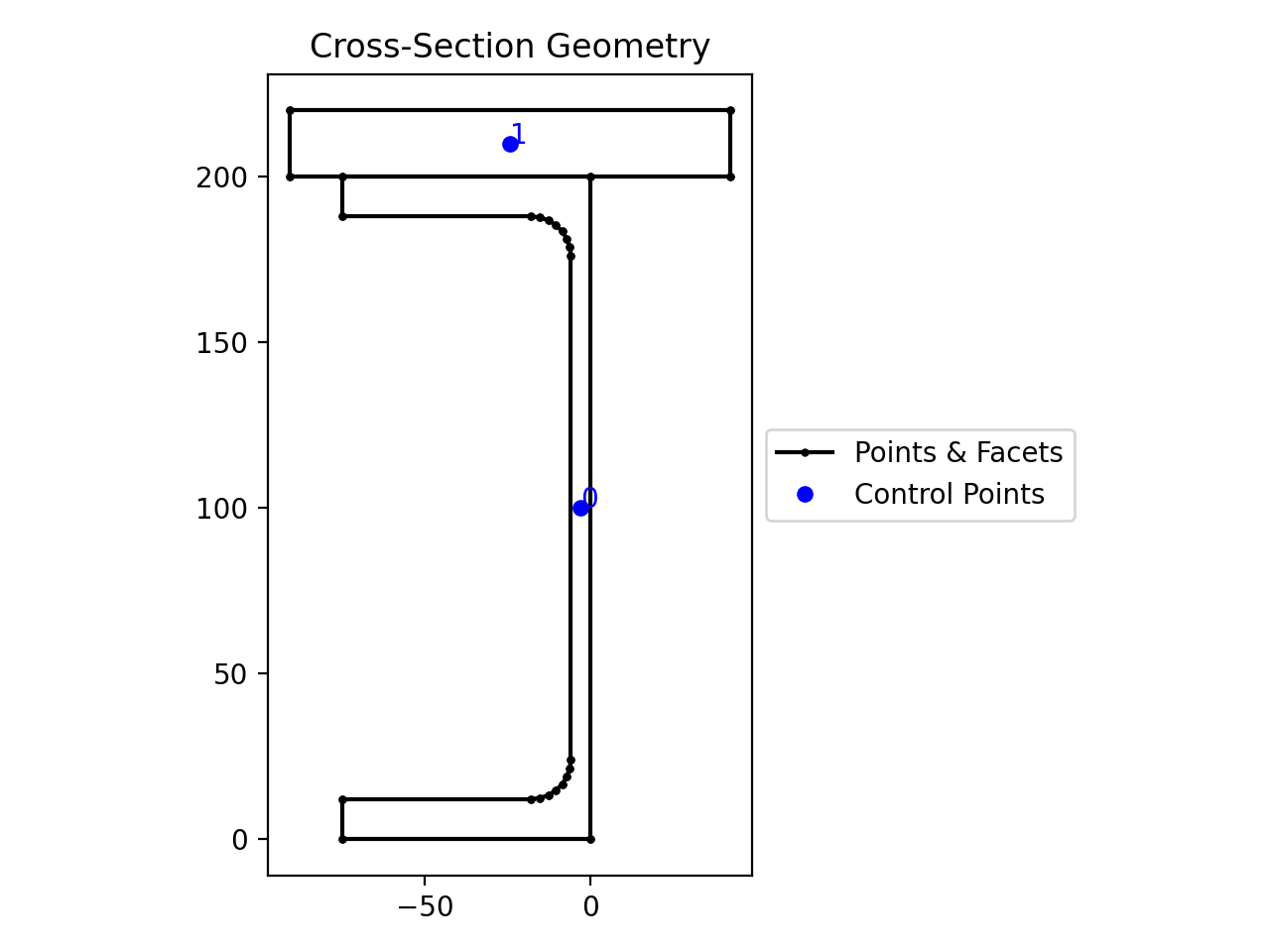
The following example mirrors a 200PFC section with a plate about the y-axis and the point
(0, 0):from sectionproperties.pre.library import rectangular_section from sectionproperties.pre.library import channel_section geom1 = channel_section(d=200, b=75, t_f=12, t_w=6, r=12, n_r=8) geom2 = rectangular_section(d=20, b=133) compound = geom1 + geom2.align_center(align_to=geom1).align_to( other=geom1, on="top" ) compound.mirror_section(axis="y", mirror_point=(0,0)).plot_geometry()
(
Source code,png,hires.png,pdf)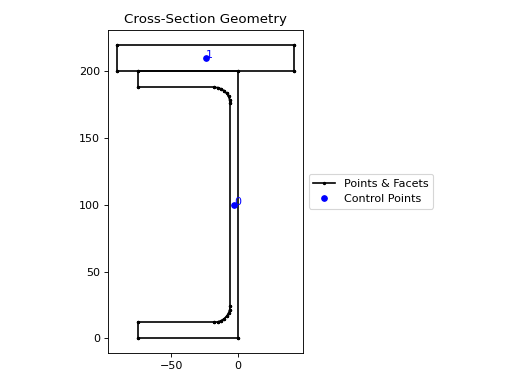
Reinforced 200PFC mirrored.#
- align_center(align_to: Geometry | tuple[float, float] | None = None) CompoundGeometry[source]#
Aligns the CompoundGeometry to a center point.
Returns a new CompoundGeometry object, translated in both
xandy, so that the center-point of the new object’s material-weighted centroid will be aligned with centroid of the object inalign_to. Ifalign_tois anx,ycoordinate, then the centroid will be aligned to the coordinate. Ifalign_tois None then the new object will be aligned with its centroid at the origin.Note
The material-weighted centroid refers to when individual geometries within the
CompoundGeometryobject have been assigned differing materials. The centroid of the compound geometry is calculated by using the elastic modulus of each geometry’s assigned material.- Parameters:
align_to (Geometry | tuple[float, float] | None) – Another Geometry to align to, an (
x,y) coordinate, orNone- Raises:
ValueError –
align_tois not valid- Returns:
CompoundGeometry object translated to new alignment
- Return type:
Example
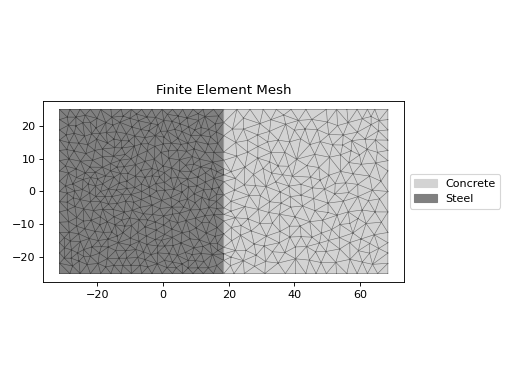
The following example creates a rectanglular steel-concrete composite section and uses the
align_center()method to place the composite centroid at the origin.from sectionproperties.pre import Material from sectionproperties.pre.library import rectangular_section from sectionproperties.analysis import Section steel = Material( name="Steel", elastic_modulus=200e3, poissons_ratio=0.3, density=7.85e-6, yield_strength=250, color="grey", ) concrete = Material( name="Concrete", elastic_modulus=30.1e3, poissons_ratio=0.2, density=2.4e-6, yield_strength=32, color="lightgrey", ) geom_steel = rectangular_section(d=50, b=50, material=steel) geom_timber = rectangular_section(d=50, b=50, material=concrete) geom = geom_timber.align_to(geom_steel, on="right") + geom_steel geom = geom.align_center() geom.create_mesh(mesh_sizes=[10, 5]) Section(geometry=geom).plot_mesh()
(
Source code,png,hires.png,pdf)
Reinforced 200PFC mirrored.#
- split_section(point_i: tuple[float, float], point_j: tuple[float, float] | None = None, vector: tuple[float, float] | None | np.ndarray = None) tuple[list[Geometry], list[Geometry]][source]#
Splits CompoundGeometry about a line.
Splits, or bisects, the geometry about an infinite line, as defined by two points on the line or by one point on the line and a vector. Either
point_jorvectormust be given. Ifpoint_jis given,vectoris ignored.Returns a tuple of two lists each containing new Geometry instances representing the
topandbottomportions, respectively, of the bisected geometry.If the line is a vertical line then the
rightandleftportions, respectively, are returned.- Parameters:
point_i (tuple[float, float]) – A tuple of (
x,y) coordinates to define a first point on the linepoint_j (tuple[float, float] | None) – A tuple of (
x,y) coordinates to define a second point on the linevector (tuple[float, float] | None | np.ndarray) – A tuple or numpy array of (
x,y) components to define the line direction.
- Returns:
A tuple of lists containing Geometry objects that are bisected about the infinite line defined by the two given points. The first item in the tuple represents the geometries on the
"top"of the line (or to the"right"of the line, if vertical) and the second item represents the geometries to the"bottom"of the line (or to the"left"of the line, if vertical).- Return type:
- offset_perimeter(amount: float = 0.0, where: str = 'exterior', resolution: int = 12) CompoundGeometry[source]#
Dilates/erodes the perimeter of a CompoundGeometry object by an amount.
- Parameters:
amount (float) – Distance to offset the section by. A negative value “erodes” the section. A positive value “dilates” the section.
where (str) – One of either
"exterior","interior", or"all"to specify which edges of the geometry to offset. If geometry has no interiors, then this parameter has no effect.resolution (int) – Number of segments used to approximate a quarter circle around a point
- Returns:
CompoundGeometry object translated to new alignment
- Return type:
Example
The following example erodes a 200UB25 with a 12 plate stiffener section by 2 mm:
from sectionproperties.pre.library import rectangular_section, i_section

geom1 = i_section(d=203, b=133, t_f=7.8, t_w=5.8, r=8.9, n_r=8)
geom2 = rectangular_section(d=12, b=133)
compound = geom1 + geom2.align_center(align_to=geom1).align_to(
    other=geom1, on="top"
)
compound.offset_perimeter(amount=-2).plot_geometry()
(
Source code,png,hires.png,pdf)
Eroded 200UB25 with stiffener.#
Note
If performing a positive offset on a
CompoundGeometrywith multiple materials, ensure that the materials propagate as desired by performing a.plot_mesh()prior to performing any analysis.
- compile_geometry() None[source]#
Creates geometry data from shapely data.
Converts the
shapely.Polygonobjects stored inself.geomsinto lists of points, facets, control_points, and hole points.
- calculate_perimeter() float[source]#
Returns the length of the exterior perimeter of the CompoundGeometry.
If the CompoundGeometry includes disjoint geometries then the perimeter cannot be calculated and the method returns -1.0.
- Returns:
CompoundGeometry perimeter
- Return type:
- __add__(other: Geometry | CompoundGeometry) CompoundGeometry#
Combine Geometry objects into a CompoundGeometry using the
+operator.- Parameters:
other (Geometry | CompoundGeometry) – Geometry object to perform the combination with
- Raises:
ValueError – Unable to perform combination operation
- Returns:
New Geometry object
- Return type:
Example
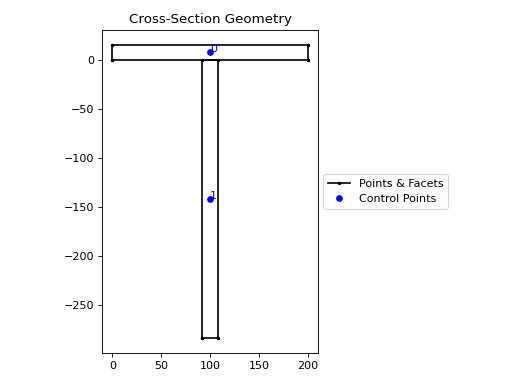
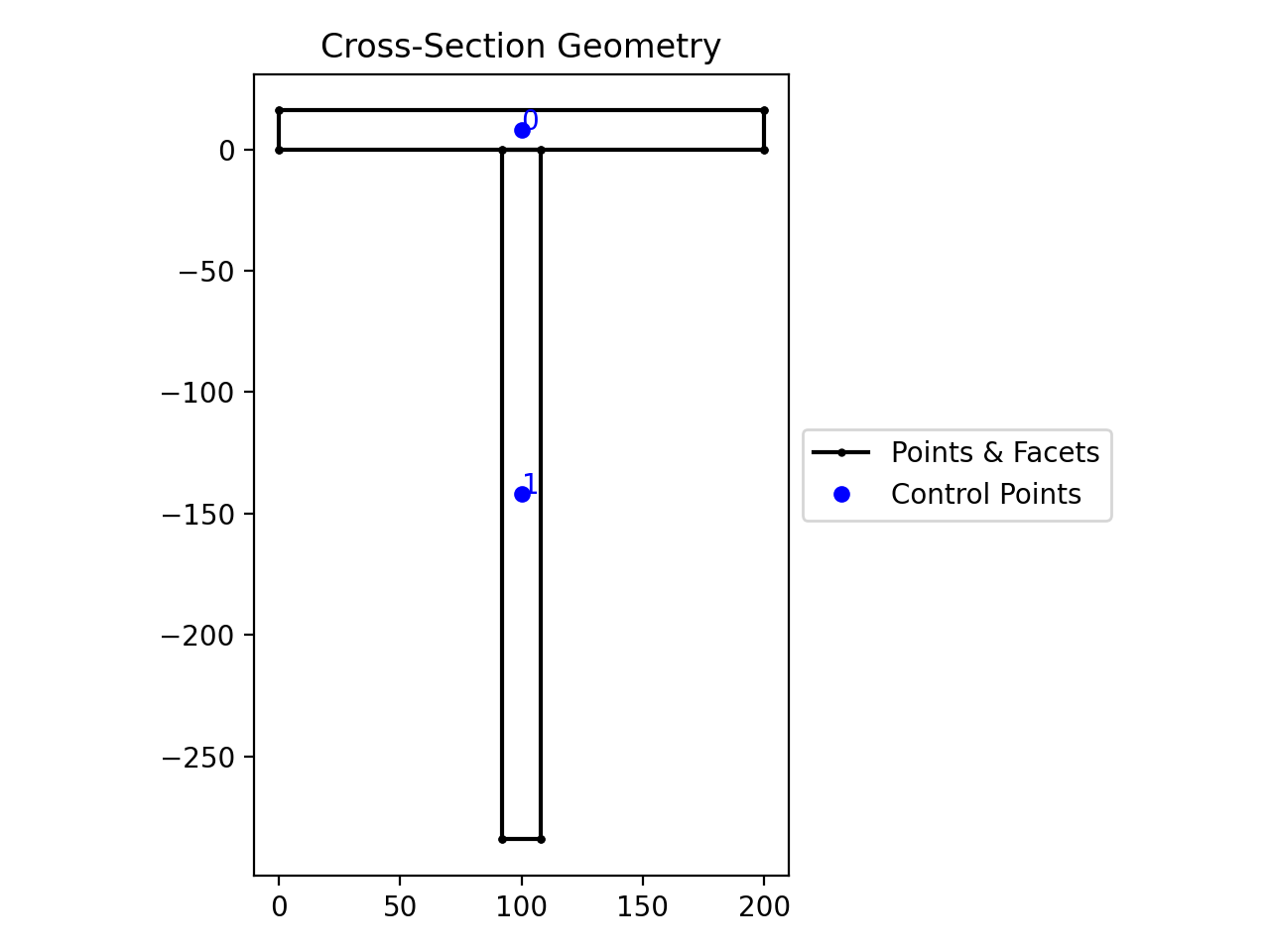
The following example creates a tee section the
+operator:from sectionproperties.pre.library import rectangular_section flange = rectangular_section(d=16, b=200) web = ( rectangular_section(d=284, b=16) .align_center(align_to=flange) .align_to(other=flange, on="bottom") ) (flange + web).plot_geometry()
(
Source code,png,hires.png,pdf)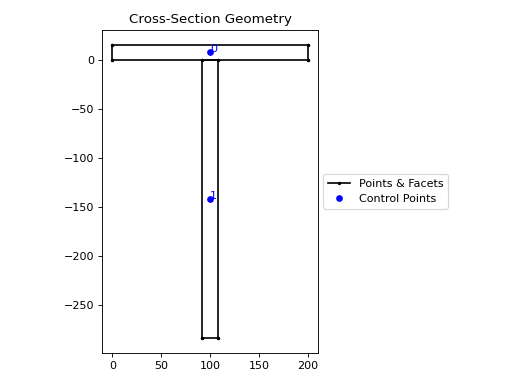
Tee section#
- __and__(other: Geometry | CompoundGeometry) Geometry | CompoundGeometry#
Performs an intersection on Geometry objects with the
&operator.Returns the regions of geometry common to both geometries.
- Parameters:
other (Geometry | CompoundGeometry) – Geometry object to perform the intersection with
- Raises:
ValueError – Unable to perform intersection
- Returns:
New Geometry object
- Return type:
Example
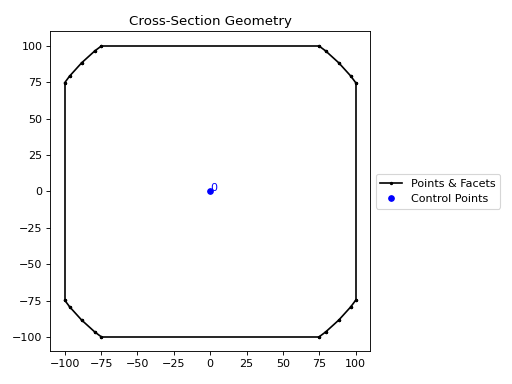
The following example performs an intersection of a square and circle using the
&operator:from sectionproperties.pre.library import rectangular_section from sectionproperties.pre.library import circular_section rect = rectangular_section(d=200, b=200).align_center(align_to=(0, 0)) circle = circular_section(d=250, n=64) (rect & circle).plot_geometry()
(
Source code,png,hires.png,pdf)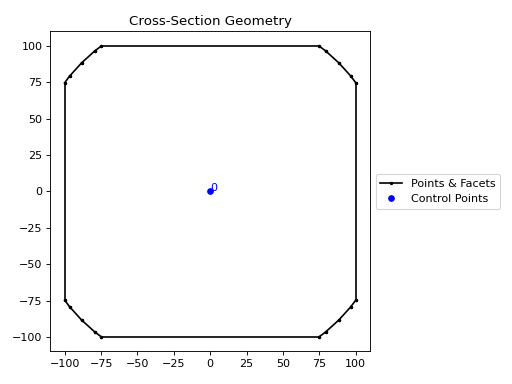
Intersection of a square and circle#
- __or__(other: Geometry | CompoundGeometry) Geometry | CompoundGeometry#
Performs a union on Geometry objects with the
|operator.- Parameters:
other (Geometry | CompoundGeometry) – Geometry object to perform the union with
- Raises:
ValueError – Unable to perform union
- Returns:
New Geometry object
- Return type:
Example
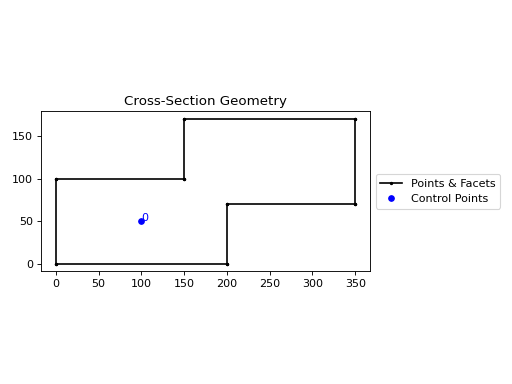
The following example combines two rectangles using the
|operator:from sectionproperties.pre.library import rectangular_section rect1 = rectangular_section(d=100, b=200) rect2 = rectangular_section(d=100, b=200).shift_section( x_offset=150, y_offset=70, ) (rect1 | rect2).plot_geometry()
(
Source code,png,hires.png,pdf)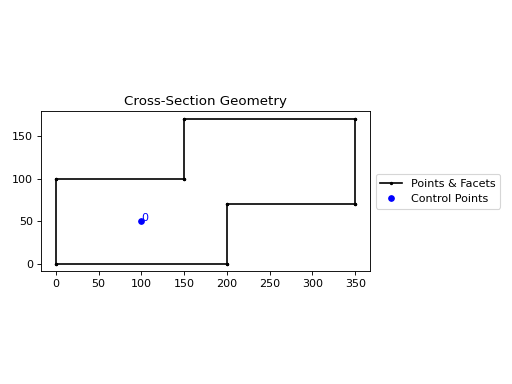
Union of two rectangles#
- __sub__(other: Geometry | CompoundGeometry) Geometry | CompoundGeometry#
Performs a difference operation on Geometry objects with the
-operator.Subtracts the second geometry from the first geometry.
- Parameters:
other (Geometry | CompoundGeometry) – Geometry object to perform the difference operation with
- Raises:
ValueError – Unable to perform difference
- Returns:
New Geometry object
- Return type:
Example
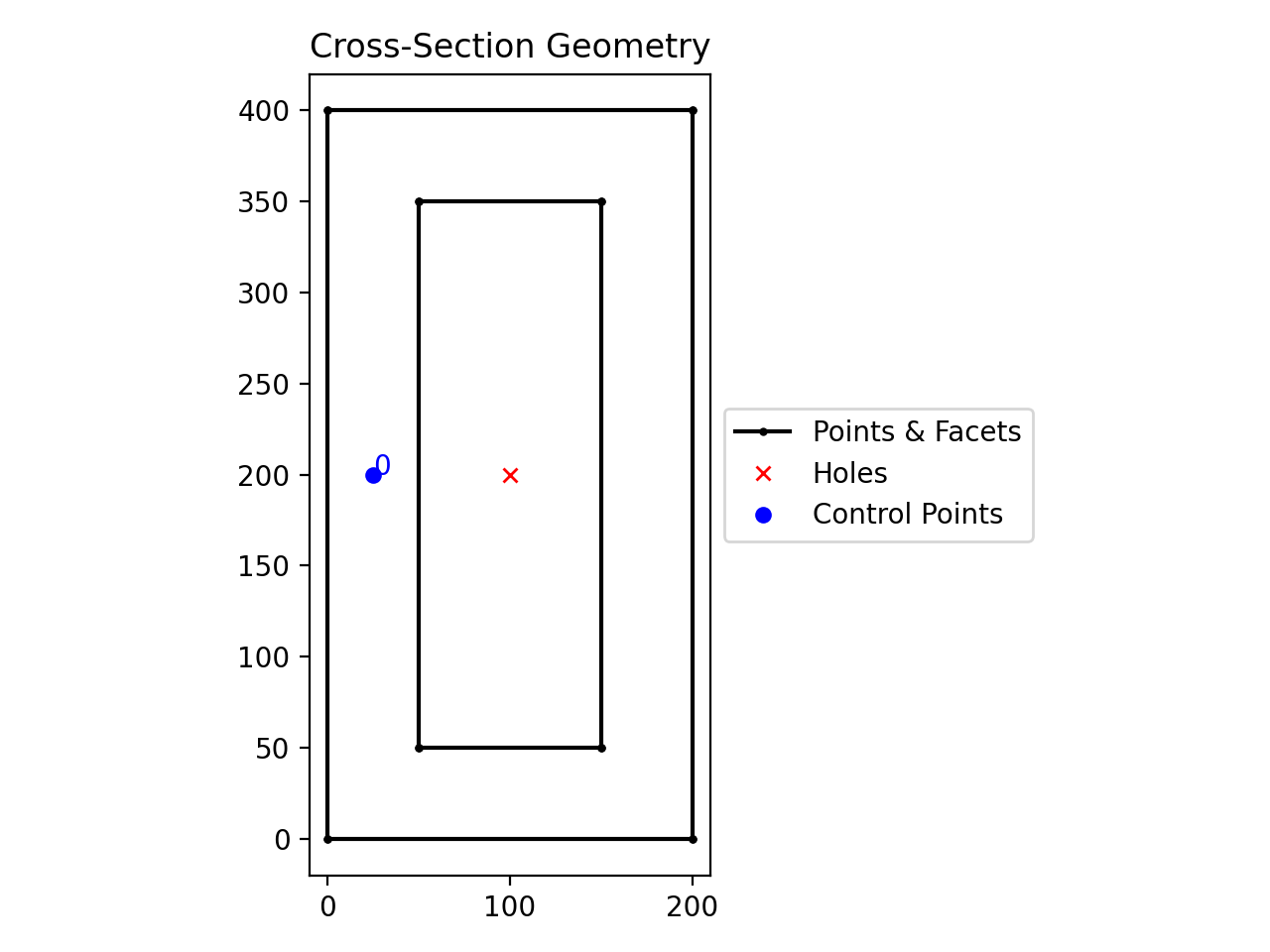
The following example creates a hollow box using the
-operator:from sectionproperties.pre.library import rectangular_section rect1 = rectangular_section(d=400, b=200) rect2 = rectangular_section(d=300, b=100).align_center(align_to=rect1) (rect1 - rect2).plot_geometry()
(
Source code,png,hires.png,pdf)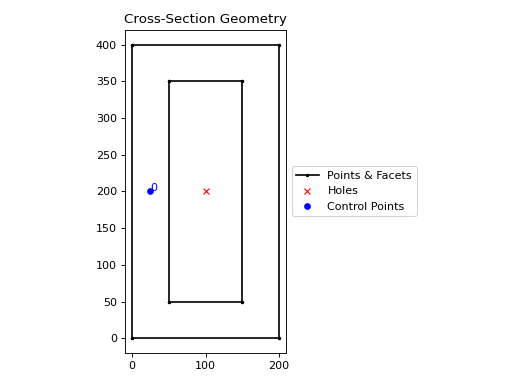
Hollow box#
- __xor__(other: Geometry | CompoundGeometry) Geometry | CompoundGeometry#
Performs a symmetric difference on Geometry objects with the
^operator.Returns the regions of geometry that are not overlapping.
- Parameters:
other (Geometry | CompoundGeometry) – Geometry object to perform the symmetric difference with
- Raises:
ValueError – Unable to perform symmetric difference
- Returns:
New Geometry object
- Return type:
Example
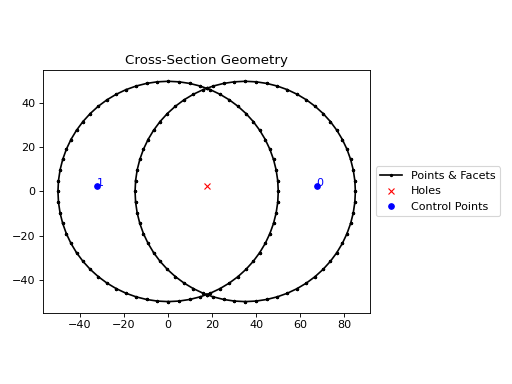
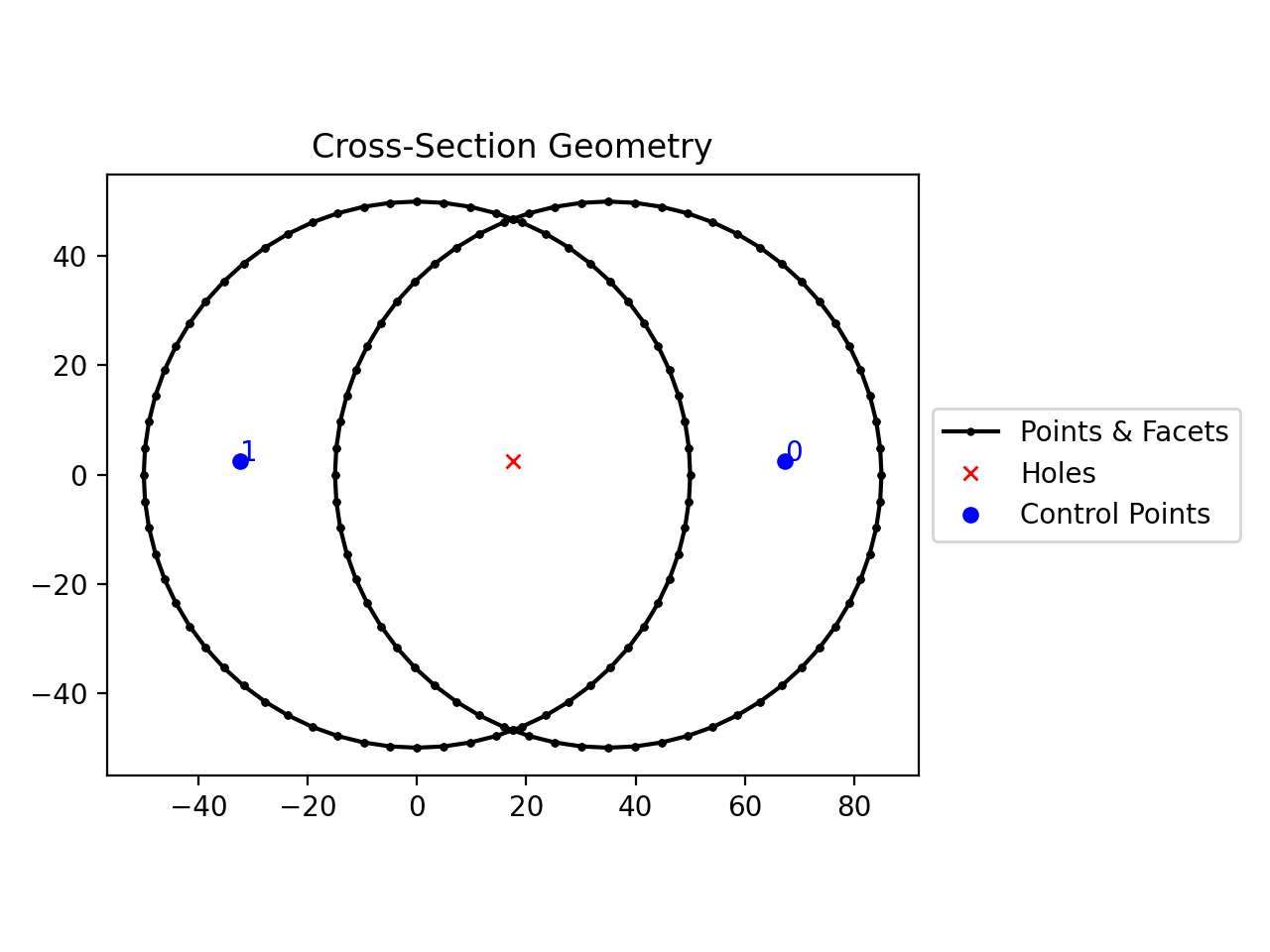
The following example performs a symmetric difference on two circles with the
^operator:from sectionproperties.pre.library import circular_section from sectionproperties.analysis import Section circ1 = circular_section(d=100, n=64) circ2 = circular_section(d=100, n=64).shift_section(x_offset=35) (circ1 ^ circ2).plot_geometry()
(
Source code,png,hires.png,pdf)
Symmetric difference of two circles#
- align_to(other: Geometry | tuple[float, float], on: str, inner: bool = False) Geometry#
Aligns the geometry to another Geometry object.
Returns a new Geometry object, representing
selftranslated so that is alignedonone of the outer bounding box edges ofother.If
otheris a tuple representing an (x,y) coordinate, then the new Geometry object will represent ‘self’ translated so that it is alignedonthat side of the point.- Parameters:
other (Geometry | tuple[float, float]) – Either another Geometry or a tuple representing an (
x,y) coordinate point thatselfshould align to.on (str) – A str of either “left”, “right”, “bottom”, or “top” indicating which side of
otherthatselfshould be aligned to.inner (bool) – If True, align
selftootherin such a way thatselfis aligned to the “inside” ofother. In other words, alignselftootheron the specified edge so they overlap.
- Returns:
Geometry object translated to alignment location
- Return type:
Example
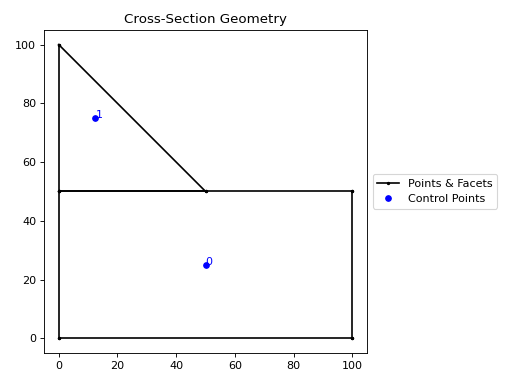
from sectionproperties.pre.library import rectangular_section
from sectionproperties.pre.library import triangular_section

rect = rectangular_section(b=100, d=50)
tri = triangular_section(b=50, h=50)
tri = tri.align_to(other=rect, on="top")
(rect + tri).plot_geometry()
(
Source code,png,hires.png,pdf)
A triangle aligned to the top of a rectangle.#
- assign_control_point(control_point: tuple[float, float]) Geometry#
Assigns a control point to the geometry.
Returns a new Geometry object with
control_pointassigned as the control point for the new Geometry. The assignment of a control point is intended to replace the control point automatically generated byshapely.Polygon.representative_point().An assigned control point is carried through and transformed with the Geometry whenever it is shifted, aligned, mirrored, unioned, and/or rotated. If a perimeter_offset operation is applied, a check is performed to see if the assigned control point is still valid (within the new region) and, if so, it is kept. If not, a new control point is auto-generated.
The same check is performed when the geometry undergoes a difference operation (with the
-operator) or a shift_points operation. If the assigned control point is valid, it is kept. If not, a new one is auto-generated.For all other operations (e.g. symmetric difference, intersection, split), the assigned control point is discarded and a new one auto-generated.
- calculate_extents() tuple[float, float, float, float]#
Calculate geometry extents.
Calculates the minimum and maximum x and y-values amongst the list of points; the points that describe the bounding box of the Geometry instance.
- create_facets_and_control_points() None#
Creates geometry data from shapely data.
Generates points, facets, control points, holes and perimeter from the shapely geometry.
- static from_dxf(dxf_filepath: str | pathlib.Path, spline_delta: float = 0.1, degrees_per_segment: float = 1) Geometry | CompoundGeometry#
An interface for the creation of Geometry objects from CAD .dxf files.
- Parameters:
dxf_filepath (str | pathlib.Path) – A path-like object for the dxf file
spline_delta (float) – Splines are not supported in
shapely, so they are approximated as polylines, this argument affects the spline sampling ratedegrees_per_segment (float) – The number of degrees discretised as a single line segment
- Returns:
Geometry or CompoundGeometry object
- Return type:
- classmethod from_rhino_encoding(r3dm_brep: str, **kwargs) Geometry#
Load an encoded single surface planer brep.
- Parameters:
r3dm_brep (str) – A Rhino3dm.Brep encoded as a string.
kwargs – See below.
- Keyword Arguments:
refine_num (Optional[int]) – Bézier curve interpolation number. In Rhino a surface’s edges are nurb based curves. Shapely does not support nurbs, so the individual Bézier curves are interpolated using straight lines. This parameter sets the number of straight lines used in the interpolation. Default is 1.
vec1 (Optional[numpy.ndarray]) – A 3d vector in the Shapely plane. Rhino is a 3D geometry environment. Shapely is a 2D geometric library. Thus a 2D plane needs to be defined in Rhino that represents the Shapely coordinate system.
vec1represents the 1st vector of this plane. It will be used as Shapely’s x direction. Default is [1,0,0].vec2 (Optional[numpy.ndarray]) – Continuing from
vec1,vec2is another vector to define the Shapely plane. It must not be [0,0,0] and it’s only requirement is that it is any vector in the Shapely plane (but not equal tovec1). Default is [0,1,0].plane_distance (Optional[float]) – The distance to the Shapely plane. Default is 0.
project (Optional[bool]) – Controls if the breps are projected onto the plane in the direction of the Shapley plane’s normal. Default is True.
parallel (Optional[bool]) – Controls if only the rhino surfaces that have the same normal as the Shapely plane are yielded. If true, all non parallel surfaces are filtered out. Default is False.
- Raises:
ImportError – If
rhino3dmis not installed. To enable rhino features usepip install sectionproperties[rhino].- Returns:
A Geometry object found in the encoded string.
- Return type:
- plot_geometry(labels: tuple[str] = ('control_points',), title: str = 'Cross-Section Geometry', cp: bool = True, legend: bool = True, **kwargs) Axes#
Plots the geometry defined by the input section.
- Parameters:
labels (tuple[str]) – A tuple of str which indicate which labels to plot. Can be one or a combination of
"points","facets","control_points", or an empty tuple to indicate no labels.title (str) – Plot title
cp (bool) – If set to True, plots the control points
legend (bool) – If set to True, plots the legend
kwargs – Passed to
plotting_context()
- Returns:
Matplotlib axes object
- Return type:
- property recovery_points: list[tuple[float, float]] | list[Point]#
Returns the recovery points.
- Returns:
Recovery points
- shift_points(point_idxs: int | list[int], dx: float = 0.0, dy: float = 0.0, abs_x: float | None = None, abs_y: float | None = None) Geometry#
Shifts the points in the geometry.
Translates one (or many points) in the geometry by either a relative amount or to a new absolute location. Returns a new Geometry representing the original with the selected point(s) shifted to the new location.
Points are identified by their index, their relative location within the points list found in
self.points. You can callself.plot_geometry(labels="points")to see a plot with the points labeled to find the appropriate point indexes.- Parameters:
point_idxs (int | list[int]) – An integer representing an index location or a list of integer index locations.
dx (float) – The number of units in the x-direction to shift the point(s) by
dy (float) – The number of units in the y-direction to shift the point(s) by
abs_x (float | None) – Absolute x-coordinate in coordinate system to shift the point(s) to. If
abs_xis provided,dxis ignored. If providing a list topoint_idxs, all points will be moved to this absolute location.abs_y (float | None) – Absolute y-coordinate in coordinate system to shift the point(s) to. If
abs_yis provided,dyis ignored. If providing a list topoint_idxs, all points will be moved to this absolute location.
- Returns:
Geometry object with selected points translated to the new location
- Return type:
Example
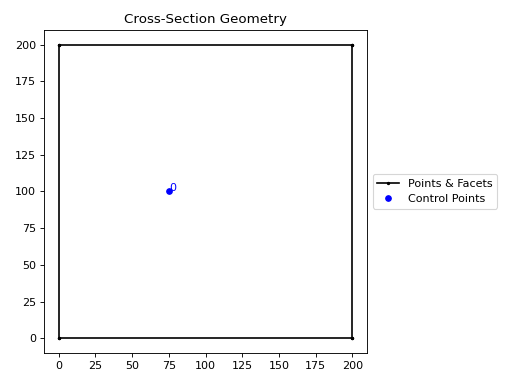
The following example expands the sides of a rectangle, one point at a time, to make it a square:
from sectionproperties.pre.library import rectangular_section

geom = rectangular_section(d=200, b=150)

# using relative shifting
geom_step_1 = geom.shift_points(point_idxs=1, dx=50)

# using absolute relocation
geom_step_1.shift_points(point_idxs=2, abs_x=200).plot_geometry()
(
Source code,png,hires.png,pdf)
Rectangle transformed to a square with
shift_points#